
 111
111 2
2 3
3 4
4 5
5 6
6 7
7 8
8 9
9 10
10 11
11 12
12 13
13 14
14 15
15 16
16 17
17 18
18 19
19 20
20 21
21 22
22 23
23 24
24 25
25 26
26 27
27 28
28 29
29 30
30 31
31 32
32 33
33 34
34 35
35 36
36 37
37 38
38 39
39 40
40 41
41 42
42 43
43 44
44 45
45 46
46 47
47 48
48 49
49 50
50 51
51 52
52 53
53 54
54 55
55 56
56 57
57 58
58 59
59 60
60 61
61
Understanding Mobile App Development, Planning, Market Research, and Requirements
Mobile applications have become an essential part of everyday life. Whether people are ordering food, managing finances, learning new skills, shopping online, or collaborating with colleagues, mobile apps are at the center of modern digital experiences. Organizations of every size—from startups to global enterprises—invest in mobile apps to improve customer engagement, streamline operations, and create new revenue opportunities.
Successful mobile app development is much more than writing code. It is a structured process that combines business strategy, user research, design thinking, engineering, quality assurance, security, and continuous improvement. Skipping any of these steps can lead to poor user experiences, wasted development budgets, and unsuccessful product launches.
This guide explains the complete mobile app development lifecycle, beginning with planning and research before moving into design, development, testing, deployment, and long-term maintenance.
Successful apps solve real problems.
Before writing a single line of code, identify the problem your app will solve and ensure there is genuine user demand.
Mobile app development is the process of designing, building, testing, deploying, and maintaining software applications for smartphones and tablets. These applications can run on platforms such as Android and iOS.
There are several development approaches:
Each approach has advantages depending on business goals, budget, performance requirements, and user expectations.
Every successful app begins with a clearly defined objective.
Ask questions such as:
Examples include:
Without clearly defined goals, projects often experience scope creep, missed deadlines, and unnecessary costs.
Instead of saying:
“We want more users.”
A SMART objective would be:
“Acquire 25,000 active users within six months while maintaining a 4.5-star average rating.”
Specific, measurable goals provide direction throughout development.
Research reduces risk before investing significant time and resources.
A comprehensive market analysis should include:
Study competing apps by examining:
User reviews often reveal recurring frustrations and opportunities for improvement.
Understanding your users is essential.
Gather information about:
Creating user personas helps guide design and development decisions.
Name: Sarah
Age: 29
Occupation: Small business owner
Goal: Manage customer appointments quickly.
Pain Point: Existing scheduling apps are too complex.
This persona helps teams prioritize simplicity and ease of use.
Many failed apps are built before confirming whether people actually want them.
Validation techniques include:
Early feedback allows teams to refine ideas before full development begins.
Expert Tip
Build the smallest version that delivers value (an MVP) before investing in advanced features.
Platform selection influences budget, timelines, and technical architecture.
Android devices are produced by many manufacturers and serve a broad global audience.
Advantages include:
Challenges include supporting many screen sizes and hardware configurations.
iOS apps target Apple devices.
Advantages include:
Frameworks such as Flutter and React Native enable developers to maintain a shared codebase while deploying apps to both Android and iOS, reducing development effort for many projects.
Avoid trying to build everything at once.
Instead, identify the features users truly need.
For a food delivery app, essential features might include:
Features such as loyalty programs or AI recommendations can often be added after launch.
The Product Requirements Document (PRD) acts as the blueprint for the project.
It typically includes:
A detailed PRD helps align stakeholders and reduces misunderstandings.
As a customer, I want to save my favorite restaurants so I can place future orders faster.
User stories keep development focused on real user needs.
Project planning transforms ideas into actionable tasks.
Planning includes:
Popular project management methodologies include Agile and Scrum, which support iterative development and regular feedback.
Avoid these frequent errors:
The planning phase lays the foundation for every successful mobile application. Investing time in market research, user validation, feature prioritization, and clear documentation significantly improves the chances of delivering a high-quality product that meets user expectations and business objectives.
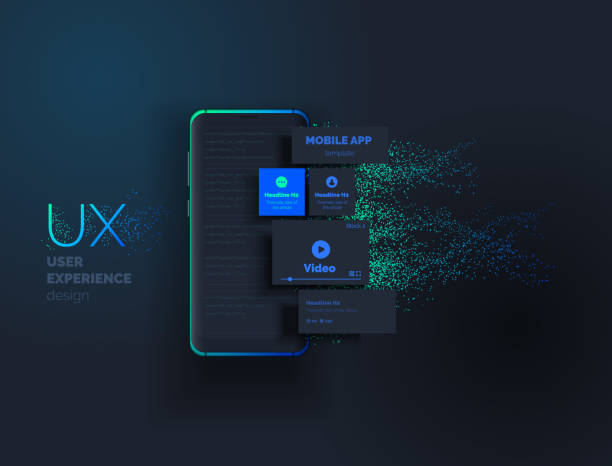
After completing market research, validating the app idea, and documenting requirements, the next phase is turning concepts into a functional product. This stage focuses on designing an intuitive user experience, selecting the right technologies, planning the app’s architecture, and building the application with clean, maintainable code.
A well-designed app is not only visually appealing but also easy to navigate, responsive, secure, and scalable.
Design for users first.
Great apps prioritize usability over unnecessary visual effects. Every screen should help users accomplish a task quickly and confidently.
User Experience (UX) design determines how users interact with the application. A thoughtful UX reduces confusion, increases satisfaction, and encourages long-term engagement.
Key UX activities include:
For an e-commerce app:
Each step should require as few actions as possible while remaining intuitive.
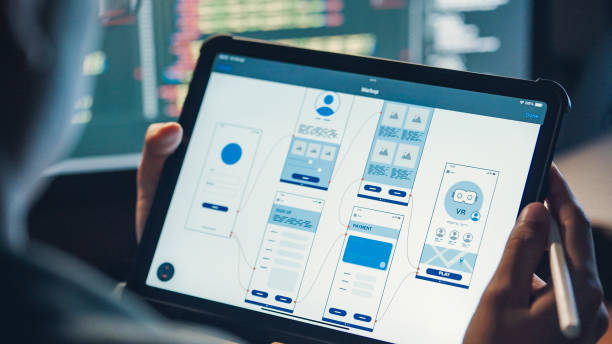
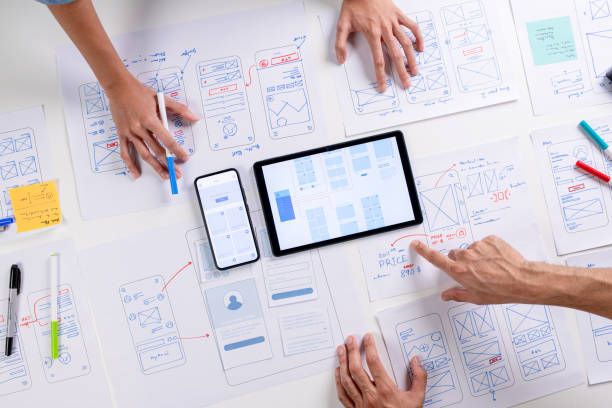
Wireframes are simple layouts that show the structure of each screen before visual design begins. They help teams validate ideas early and reduce costly design changes later.
Interactive prototypes simulate user interactions, allowing stakeholders and test users to experience the app before development starts.
Benefits include:
The User Interface (UI) focuses on the visual appearance of the application.
Important design elements include:
Consistency across all screens strengthens brand identity and makes the app easier to use.
Design Tip
Follow platform-specific design standards to provide users with familiar interactions and navigation patterns.
An inclusive app serves a wider audience and often improves usability for everyone.
Accessibility best practices include:
Designing with accessibility in mind helps meet user expectations and supports compliance with accessibility guidelines.
The technology stack determines how the application is built and maintained.
The front end is what users interact with on their devices.
Common technologies include:
The choice depends on performance requirements, budget, and target platforms.
The back end manages business logic, databases, authentication, notifications, and APIs.
Common server-side technologies include:
A scalable back end ensures the app performs well as the user base grows.
Applications often store user accounts, settings, content, and transaction data.
Popular database solutions include:
The right choice depends on data structure, scalability, and synchronization needs.
A well-structured architecture improves code quality, simplifies maintenance, and supports future feature additions.
Common architectural patterns include:
Benefits of a strong architecture:
Modern mobile apps often rely on external services.
Examples include:
Before integrating any service, review its official documentation, pricing, and security recommendations.
Development usually follows Agile methodologies, with work divided into short iterations or sprints.
Typical development tasks include:
Frequent testing during development helps identify issues early.
Using a version control system enables developers to collaborate efficiently and maintain a history of code changes.
Good practices include:
Security should be integrated throughout the development lifecycle rather than added at the end.
Recommended practices:
Security Reminder
Protecting user data is essential for building trust and meeting legal and regulatory requirements.
By the end of this stage, the application should have:

By this stage, the application’s core features have been designed and developed. Before releasing the app to users, it must undergo rigorous testing to ensure reliability, security, performance, and compatibility across supported devices. A successful launch depends not only on the quality of the code but also on careful preparation for deployment and ongoing monitoring.
Testing is an investment, not an expense.
Finding and fixing issues before release is significantly less costly than addressing negative reviews, security incidents, or user dissatisfaction after launch.
Testing verifies that the application functions as intended under a wide range of conditions.
Functional testing checks whether every feature works according to the product requirements.
Examples include:
Each user action should produce the expected result without errors.
Usability testing evaluates how easily real users can interact with the application.
Objectives include:
Observing users complete common tasks often reveals design improvements that internal teams may overlook.
Mobile devices vary widely in screen sizes, operating system versions, hardware capabilities, and manufacturers.
Compatibility testing ensures the app performs consistently across supported:
Performance testing measures how efficiently the app operates under normal and heavy usage.
Metrics include:
Optimizing these metrics contributes to a smoother user experience.
Security is a continuous responsibility throughout the app lifecycle.
Important practices include:
Failure to prioritize security can expose users to data breaches and damage an organization’s reputation.
Security Best Practice
Adopt a “security by design” approach, incorporating security reviews and testing into every development phase.
Quality Assurance combines manual and automated testing to verify that the application meets business and technical expectations.
QA teams typically evaluate:
Comprehensive QA helps ensure a polished product before release.
Optimization improves responsiveness and reduces resource consumption.
Areas to optimize include:
Continuous profiling helps identify bottlenecks before users experience slowdowns.
Each app marketplace has specific submission requirements.
Before publishing, developers should prepare:
Google reviews submissions for policy compliance and security.
Apple requires additional review for quality, functionality, and adherence to its App Review Guidelines.
Developers should verify:
Careful preparation helps reduce the likelihood of review delays.
A limited beta release allows selected users to evaluate the app before public launch.
Benefits include:
Feedback gathered during beta testing often leads to meaningful refinements.
Publishing the app is the beginning of an ongoing improvement process.
Teams should monitor:
Promptly addressing reported issues demonstrates commitment to user satisfaction.
Avoid these common pitfalls:
A successful mobile app launch depends on more than development alone. Thorough testing, strong security practices, performance optimization, careful preparation for app store submission, and continuous monitoring are essential for delivering a reliable and trusted product. Organizations that invest in quality assurance and post-launch improvements are better positioned to retain users and achieve long-term success.
Launching a mobile application is a major milestone, but it is not the end of the development journey. The most successful apps continue to evolve through regular updates, performance improvements, security enhancements, and user-driven feature development. Long-term success depends on continuously delivering value while adapting to changing technologies and user expectations.
Callout: An app is a living product.
Continuous improvement, responsive support, and regular innovation are essential for maintaining user trust and achieving sustainable growth.
Maintenance ensures that an app remains secure, functional, and compatible with new operating system releases and devices.
Common maintenance activities include:
A consistent release schedule demonstrates commitment to quality and keeps users engaged.
Analytics help teams understand how users interact with the application and identify opportunities for improvement.
Key performance indicators (KPIs) include:
By analyzing these metrics, developers and product managers can make informed decisions about future updates.
User feedback is one of the most valuable resources for improving an app.
Sources of feedback include:
Responding professionally to feedback builds trust and demonstrates a commitment to customer satisfaction.
Best Practice
Prioritize improvements based on recurring user feedback and measurable impact rather than isolated feature requests.
Selecting an appropriate monetization strategy depends on the target audience, business model, and app category.
Common monetization methods include:
Users pay a one-time fee before downloading the application.
Users can purchase digital content, premium features, subscriptions, or virtual goods within the app.
Customers pay recurring monthly or annual fees for ongoing access to premium services or content.
Advertising networks can display banner ads, interstitial ads, rewarded ads, or native ads while maintaining a positive user experience.
The application is free to download, with optional premium features available through upgrades or subscriptions.
Choosing the right monetization strategy should balance business goals with user satisfaction.
Even a high-quality application requires effective marketing to reach its intended audience.
Marketing strategies include:
Consistent marketing efforts help increase downloads and user engagement.
As user adoption increases, infrastructure should scale to maintain performance and reliability.
Scalability considerations include:
Planning for growth from the beginning reduces future operational challenges.
The mobile app industry continues to evolve rapidly. Organizations should monitor emerging technologies to remain competitive.
Important trends include:
Adopting relevant innovations can improve user experiences and create new business opportunities.
Before considering your mobile application mature, ensure that it has:
Mobile app development is a structured, collaborative process that extends far beyond coding. It begins with understanding user needs and defining business goals, continues through careful planning, user-centered design, development, testing, and deployment, and evolves through continuous maintenance and improvement.
Organizations that invest in research, usability, security, quality assurance, and long-term support are more likely to deliver applications that users trust and recommend. By following the step-by-step process outlined in this guide and relying on official platform guidance, developers can create scalable, secure, and engaging mobile applications that provide lasting value.
Completing the development process is only one aspect of creating a successful mobile application. Long-term success depends on understanding user behavior, making data-driven decisions, maintaining high security standards, and continuously improving the product based on feedback and analytics.
Build for users, not assumptions.
Successful mobile applications are shaped by continuous learning. Release improvements based on real user data rather than guessing what users want.
A professional mobile app project typically follows this lifecycle:
Best Practice
Treat the first release as the beginning of the product journey, not the final destination.
Business Goal: Enable customers to order meals from local restaurants.
Core Features:
Post-Launch Improvements:
This phased approach allows businesses to launch sooner, gather user feedback, and expand the app over time.
Many apps struggle because of avoidable mistakes:
⚠️ Callout: Avoid feature overload.
A focused app with a few well-executed features often performs better than an app with dozens of unfinished or confusing features.
Professional development teams commonly recommend:
Before publishing your application, confirm that you have completed the following:
✅ Functional testing
✅ Performance optimization
✅ Accessibility review
✅ Privacy policy
✅ Secure authentication
✅ Data encryption
✅ App Store assets
✅ Analytics integration
✅ Crash reporting
✅ Backup and recovery plan
Successful apps typically share these characteristics:
Mobile app development is an ongoing process of innovation, testing, learning, and improvement. Organizations that combine thoughtful planning, user-centered design, secure engineering, and continuous maintenance are better positioned to build applications that users trust and recommend.
By following the complete development lifecycle—from idea validation to long-term maintenance—you can create mobile applications that are scalable, reliable, and capable of supporting both user needs and business growth.
Key Takeaway
The most successful mobile apps are not necessarily those with the most features—they are the ones that consistently solve real problems, provide a seamless user experience, and evolve through continuous improvement.

After understanding the complete mobile app development lifecycle, many readers have practical questions about development costs, timelines, programming languages, career paths, and the tools professionals use. This section answers those common questions and highlights resources that can help both aspiring developers and businesses succeed.
The timeline depends on the app’s complexity.
Factors such as team size, feature requirements, integrations, testing, and revisions all affect development time.
Costs vary based on:
Rather than focusing only on initial development costs, businesses should also budget for ongoing updates, security improvements, and infrastructure.
The best choice depends on project goals, team expertise, and performance requirements.
A Minimum Viable Product (MVP) is the first version of an app that includes only the essential features needed to solve the primary user problem.
Launching an MVP helps teams:
Updates help:
Apps that receive regular updates are generally more competitive and better positioned for long-term success.
Mobile app development offers diverse career paths, including:
Professionals often collaborate in cross-functional teams to deliver high-quality applications.
Commonly used tools include:
Selecting tools that align with project requirements improves efficiency and collaboration.
Organizations should strive to:
Mobile app development is a multidisciplinary process that combines strategic planning, thoughtful design, robust engineering, quality assurance, security, and ongoing maintenance. Every stage—from defining the initial concept to monitoring the app after launch—contributes to the overall success of the product.
By following a structured development process, using official platform guidance, and continually improving the application based on user feedback and analytics, developers and organizations can create mobile apps that are reliable, secure, scalable, and valuable to their users.
Whether you are building your first mobile application or managing a large-scale enterprise project, a commitment to quality, user experience, and continuous innovation will help your app remain competitive in an ever-evolving mobile ecosystem.
The information presented in this article, “Mobile App Development: Step-by-Step Process Explained,” is provided for general educational and informational purposes only. Every effort has been made to ensure the content is accurate, relevant, and based on recognized industry practices and official documentation available at the time of writing. However, technology, software platforms, development tools, and mobile operating system requirements change frequently. Readers should verify the latest recommendations through official sources before making technical or business decisions.
This article does not constitute legal, financial, cybersecurity, business, engineering, or professional consulting advice. Decisions regarding software architecture, regulatory compliance, privacy, security, intellectual property, or commercial strategy should be made in consultation with qualified professionals.
Android, Google Play, Flutter, Firebase, Material Design, Apple, iOS, App Store, Swift, Xcode, React Native, and other product names, trademarks, and registered trademarks mentioned in this article belong to their respective owners. Their inclusion is for educational and informational purposes only and does not imply endorsement, sponsorship, or affiliation.
This article references official documentation and educational resources published by technology providers to help readers access the most up-to-date information. The author is not responsible for the availability, accuracy, security, or content of external websites. Readers should always review the latest official documentation directly.
Although reasonable efforts have been made to keep this content current, software development frameworks, APIs, security recommendations, app store policies, and platform requirements may change over time. Readers are encouraged to consult the latest official documentation before implementing technical solutions or publishing mobile applications.
The author and publisher shall not be held responsible for any direct, indirect, incidental, consequential, or other damages resulting from the use of, or reliance upon, the information contained in this article. All implementation decisions and outcomes remain the responsibility of the reader or organization.
This article is an original educational work prepared for informational purposes. Readers may reference or share brief excerpts with appropriate attribution where permitted by applicable copyright laws. Unauthorized reproduction, redistribution, or commercial resale of the complete work without permission may violate copyright laws.
For the latest standards, platform requirements, design guidance, and security recommendations, consult the official documentation provided by:
Readers should rely on these official resources for the most current technical guidance and platform policies.