
 111
111 2
2 3
3 4
4 5
5 6
6 7
7 8
8 9
9 10
10 11
11 12
12 13
13 14
14 15
15 16
16 17
17 18
18 19
19 20
20 21
21 22
22 23
23 24
24 25
25 26
26 27
27 28
28 29
29 30
30 31
31 32
32 33
33 34
34 35
35 36
36 37
37 38
38 39
39 40
40 41
41 42
42 43
43 44
44 45
45 46
46 47
47 48
48 49
49 50
50 51
51 52
52 53
53 54
54 55
55 56
56 57
57 58
58 59
59 60
60 61
61Beginner’s Guide: Learn what mobile app development is, how it works, the different types of mobile apps, the technologies involved, and how to start building your first application.
Mobile applications have become an essential part of modern life. Whether you are checking your bank balance, ordering food, learning a new language, booking transportation, managing business operations, or communicating with family and friends, chances are you are using a mobile app.
Businesses of every size—from startups to multinational corporations—invest heavily in mobile applications because customers increasingly expect fast, convenient, and personalized digital experiences on their smartphones and tablets.
Mobile app development is therefore one of today’s most valuable technical skills and one of the fastest-growing areas of software engineering. According to official guidance from both Apple and Google, mobile apps continue to power billions of devices worldwide, creating opportunities for developers, entrepreneurs, and businesses alike.
This guide explains everything a beginner needs to understand before learning mobile app development, including the development process, programming languages, frameworks, career opportunities, common challenges, and best practices.

Mobile app development is the process of designing, building, testing, deploying, and maintaining software applications that run on smartphones, tablets, wearable devices, and other mobile hardware.
Unlike traditional desktop software, mobile applications are specifically designed for mobile operating systems such as:
A mobile application combines:
The goal is to provide users with useful, reliable, secure, and engaging experiences.
Mobile devices have transformed how people access information and services. Organizations use mobile apps to:
Industries using mobile applications include:
Consumers interact daily with applications such as:
Each solves a unique problem while delivering a seamless mobile experience.
Most mobile applications consist of three major components.
This is everything users see and interact with, including:
Developers focus on creating interfaces that are intuitive, responsive, and accessible.
The backend manages:
Many apps communicate continuously with cloud servers.
Application Programming Interfaces (APIs) allow apps to communicate with external systems, enabling features such as:
Native applications are built specifically for one operating system.
Android apps commonly use Kotlin or Java.
iOS apps commonly use Swift.
Advantages include:
Disadvantages include maintaining separate codebases for different platforms.
Cross-platform development allows one codebase to run on multiple operating systems.
Popular frameworks include:
Advantages include:
PWAs are websites that behave similarly to mobile apps.
They can offer:
PWAs reduce development costs while expanding accessibility.
Android is Google’s mobile operating system and powers devices from numerous manufacturers.
Developers typically use Android Studio and Kotlin.
Key strengths include:
Apple’s iOS powers iPhone devices.
Development generally uses Xcode and Swift.
Benefits include:
Professional mobile development generally follows these stages:
Each stage contributes to producing a reliable, scalable, and user-friendly application.
Do not start coding immediately. Successful mobile apps begin with understanding the user’s problem, researching competitors, and designing a simple, intuitive user experience before writing code.
The following official resources provide authoritative documentation and guidance for mobile app development:
Google. Android Developers Documentation.
Apple. Apple Developer Documentation.
Google. Android Studio Documentation.
Flutter Team. Flutter Official Documentation.
Meta. React Native Official Documentation.
JetBrains. Kotlin Official Documentation.
Swift.org. The Swift Programming Language.
Firebase. Firebase Official Documentation.
A well-designed mobile application is built on a solid architecture that makes the app easier to develop, maintain, test, and scale. Architecture defines how different parts of an application communicate with one another.
The three core architectural layers are:
This is the user-facing part of the application. It includes:
A good presentation layer is simple, intuitive, responsive, and accessible to all users.
This layer handles the application’s core functionality, including:
Separating business logic from the interface improves code quality and maintainability.
The data layer manages information storage and retrieval from:
This separation allows developers to update the backend without redesigning the user interface.
Choosing the right architecture early helps reduce bugs, simplifies testing, improves collaboration among developers, and makes future updates faster and less expensive.
Different mobile platforms use different programming languages.
Kotlin is Google’s recommended language for modern Android development.
Advantages include:
Java has powered Android development for many years and remains widely used in enterprise applications.
Benefits include:
Swift is Apple’s modern programming language for iOS, iPadOS, watchOS, and macOS development.
Advantages include:
Dart is the language behind Flutter, enabling developers to build applications for Android, iOS, web, and desktop from a single codebase.
Its strengths include:
Flutter is Google’s open-source UI toolkit for building cross-platform applications from one codebase.
Key features include:
Flutter is widely adopted by startups and enterprises alike.
React Native, maintained by Meta, allows developers to build mobile apps using JavaScript and React.
Benefits include:
Microsoft’s .NET MAUI enables developers to build applications for Android, iOS, Windows, and macOS using C# and .NET.
It is particularly attractive to organizations already invested in the Microsoft ecosystem.
Beginners should select a framework based on their goals. If your focus is Android, Kotlin is an excellent choice. If you want to target multiple platforms with one codebase, Flutter is a popular and beginner-friendly option.
Professional developers rely on specialized software to build and test applications efficiently.
Android Studio is Google’s official Integrated Development Environment (IDE) for Android development.
Features include:
Xcode is Apple’s official IDE for developing applications across the Apple ecosystem.
It provides:
Many Flutter and React Native developers use Visual Studio Code because of its lightweight design and extensive extension ecosystem.
Applications often store information locally or in the cloud.
Common database solutions include:
Developers choose databases based on performance, scalability, and synchronization requirements.
APIs enable applications to exchange information with external systems.
Examples include:
Well-designed APIs improve interoperability and expand application functionality.
Modern applications increasingly rely on cloud infrastructure for:
Cloud platforms reduce infrastructure management and help applications scale more effectively.
Many successful mobile apps are not defined by the number of features they offer but by how reliably and intuitively they solve a specific user problem. A simple, well-designed app often outperforms a feature-rich app with a poor user experience.
For further learning, consult these official developer resources:
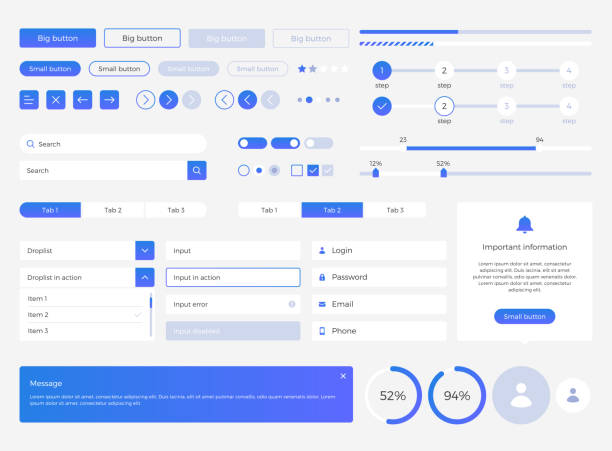
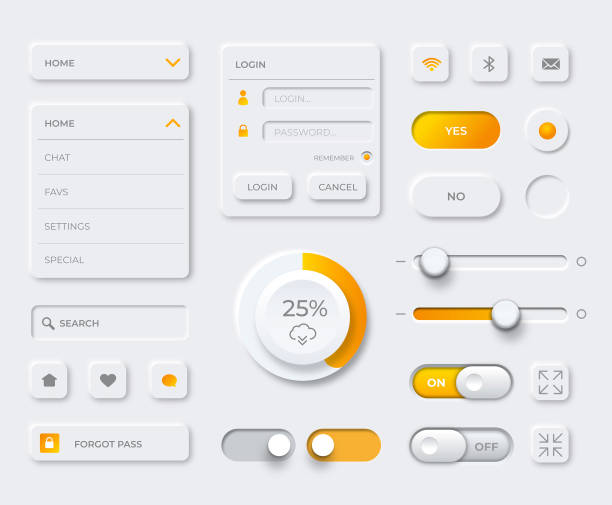
The User Interface (UI) is the visual layer of a mobile application. It includes every element users see and interact with, such as buttons, icons, menus, colors, typography, and layouts.
A good UI should be:
Modern design systems such as Google’s Material Design and Apple’s Human Interface Guidelines help developers create familiar and intuitive experiences.
User Experience (UX) focuses on how users feel while interacting with an application. A positive UX helps users complete tasks efficiently and encourages them to continue using the app.
Key UX principles include:
Excellent UX often determines whether an app succeeds or fails.
Accessibility ensures that mobile apps can be used by everyone, including people with disabilities.
Best practices include:
Designing for accessibility also improves usability for all users.
Testing is a critical stage of mobile app development. It helps identify bugs, improve performance, and ensure a smooth user experience before release.
Common types of testing include:
Verifies that all features work as intended.
Measures speed, responsiveness, memory usage, and battery consumption.
Checks for vulnerabilities such as insecure data storage, weak authentication, and network security issues.
Evaluates how easily real users can navigate and interact with the application.
Ensures the app works correctly across different devices, operating system versions, and screen sizes.
Fixing bugs during development is significantly easier and less costly than addressing them after your app has been published. Continuous testing should be part of every development cycle.
Security is essential for protecting user data and maintaining trust.
Developers should:
Regular security audits help identify and resolve potential vulnerabilities.
Once development and testing are complete, the application can be submitted to an app marketplace.
For Android applications, developers publish apps through Google Play Console after meeting Google’s policies and technical requirements.
For iOS applications, developers submit apps through App Store Connect. Apple reviews each submission to ensure compliance with its App Review Guidelines before approval.
Publishing also involves preparing:
Developers frequently encounter challenges such as:
Planning for these challenges early improves long-term project success.
As mobile technology continues to grow, skilled developers are in high demand across industries.
Popular career paths include:
Many professionals also choose freelance work or launch their own mobile applications.
If you are new to mobile app development:
Consistent practice and continuous learning are key to becoming a successful mobile developer.
Successful mobile applications are rarely finished after their first release. The most effective apps evolve through user feedback, analytics, regular updates, performance improvements, and ongoing feature enhancements.
For authoritative guidance, refer to these official resources:

Mobile technology continues to evolve rapidly. Developers who stay current with emerging technologies will be better positioned to create innovative and competitive applications.
Artificial intelligence is becoming a core feature of modern mobile applications. AI enables:
Official AI services from companies such as Google, Apple, Microsoft, and OpenAI continue to expand what mobile apps can accomplish.
Mobile apps increasingly connect with smart devices including:
IoT applications rely on secure communication between mobile devices and connected hardware.
The expansion of 5G networks improves:
Developers can build richer experiences by taking advantage of faster mobile networks.
AR and VR technologies are being adopted across industries such as:
Mobile devices increasingly support immersive experiences using built-in cameras and sensors.
Developers and businesses use various methods to generate revenue from mobile applications.
Common strategies include:
The best monetization model depends on the target audience and the value the app provides.
Many new developers encounter similar challenges when starting their mobile development journey.
Avoid these common mistakes:
Learning from these mistakes early helps developers build better applications.
Mobile app development is constantly changing. Regularly reading official documentation, experimenting with new tools, and building personal projects are among the best ways to improve your skills over time.

Learning mobile development requires dedication and consistent practice. Beginners can make steady progress by starting with small projects and gradually learning more advanced concepts.
If your goal is Android development, Kotlin is an excellent starting point. If you want to build apps for both Android and iOS from one codebase, Flutter is a popular choice.
Yes. Professional mobile app development requires a computer capable of running development tools such as Android Studio or Xcode.
The learning timeline varies depending on your experience and the amount of time you dedicate to study and practice. Building projects consistently is one of the fastest ways to improve.
Yes. Independent developers can publish applications on supported app stores after meeting the platform’s technical, security, and policy requirements.
Mobile app development is one of the most exciting and rewarding areas of software engineering. From solving everyday problems to building innovative digital businesses, mobile applications have transformed how people work, learn, communicate, and access services.
For beginners, success starts with understanding the fundamentals, practicing consistently, and relying on trusted official resources. Every successful application begins with a simple idea, careful planning, and a commitment to creating value for users.
Whether your goal is to become a professional developer, launch your own startup, or expand your technical skills, mobile app development offers countless opportunities for growth in today’s digital economy.
For authoritative guidance, tutorials, and documentation, refer to these official sources:
This guide is intended for educational purposes. Platform features, programming languages, development tools, app store policies, and software frameworks evolve over time. Always consult the official documentation from Google, Apple, Microsoft, Flutter, Meta, JetBrains, and other technology providers for the most current technical guidance and requirements before developing or publishing a mobile application.