
 111
111 2
2 3
3 4
4 5
5 6
6 7
7 8
8 9
9 10
10 11
11 12
12 13
13 14
14 15
15 16
16 17
17 18
18 19
19 20
20 21
21 22
22 23
23 24
24 25
25 26
26 27
27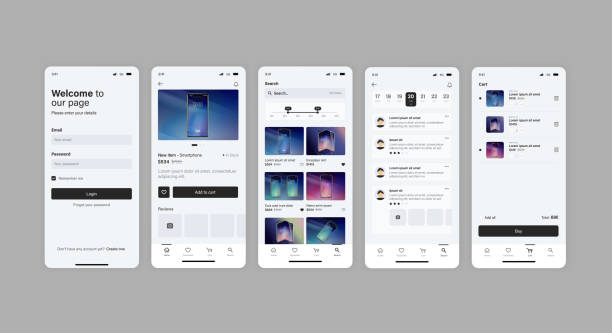 28
28 29
29 30
30 31
31 32
32 33
33 34
34 35
35 36
36 37
37 38
38 39
39 40
40 41
41 42
42 43
43 44
44 45
45 46
46 47
47 48
48 49
49 50
50 51
51 52
52 53
53 54
54 55
55 56
56 57
57 58
58 59
59 60
60 61
61Key Takeaway
Every successful mobile app starts with a clear understanding of a real user problem. Careful planning, market validation, and defining a focused Minimum Viable Product (MVP) are the foundation of long-term success.
Planning, Research, and Laying the Foundation
Mobile applications have transformed the way people communicate, shop, learn, travel, work, and manage their daily lives. From simple utility apps to enterprise platforms, mobile software is now a critical part of the global digital economy. However, creating a successful app requires far more than coding. It involves research, strategic planning, user-centered design, technology selection, testing, and continuous improvement.
Whether you are a startup founder, entrepreneur, student, or software developer, understanding the complete app development process helps reduce risk and improves the chances of building an application that users genuinely value.
This guide follows industry best practices recommended by Apple, Google, and leading software engineering organizations.
In this first part, you will learn how to:
These steps provide the strategic foundation before any design or programming begins.
Expert Insight
Many failed apps were technically impressive but solved no meaningful problem. The strongest products begin with understanding users—not technology.
Every successful application solves a genuine problem.
Before writing a single line of code, ask yourself:
For example, instead of creating “another social networking app,” you might develop a networking platform specifically designed for freelance engineers or healthcare professionals. Solving a specific problem for a defined audience is often more successful than targeting everyone.
Market research helps validate demand and identify opportunities.
Research should include:
Reading reviews on the Apple App Store and Google Play Store often reveals recurring user frustrations. These insights can inspire features that differentiate your app.
Research Tip
Focus especially on one-star and two-star reviews. They often highlight problems that competing apps have not solved effectively.
Validation confirms whether people are interested before significant time and money are invested.
Common validation techniques include:
If users express excitement before development begins, your chances of launching successfully improve considerably.
Trying to build an app for everyone usually results in an app that appeals to no one.
Create detailed user personas by identifying:
Name: Sarah
Age: 30
Occupation: Small Business Owner
Goals:
Challenges:
Understanding users like Sarah helps guide every design and development decision.
Best Practice
Whenever a new feature is proposed, ask:
“Will this make life easier for our target user?”
Avoid trying to build everything at once.
Prioritize features into three categories.
These are essential for launch.
Examples include:
Important improvements that can be included if time permits.
Examples:
Future enhancements.
Examples:
Prioritizing features keeps development focused and manageable.
A Minimum Viable Product contains only the features required to solve the primary user problem.
Benefits include:
Many globally successful apps began as simple MVPs before expanding into full-featured platforms.
MVP
Launching an MVP does not mean releasing poor-quality software. It means releasing a polished product with a focused feature set.
Your platform choice depends on your audience, budget, and business goals.
Advantages:
Primary language:
Advantages:
Primary language:
Popular frameworks include Flutter and React Native.
Advantages:
Cross-platform development is often ideal for startups and businesses launching on both Android and iOS simultaneously.
A technology stack consists of the software tools used to build your application.
Typical components include:
Responsible for:
Popular backend platforms include Firebase and Supabase.
Examples include:
Examples include:
Choose technologies that align with your team’s expertise, scalability requirements, and long-term maintenance goals.
Chapter Summary
✔ Identified a real problem to solve.
✔ Researched competitors and the market.
✔ Validated the app idea.
✔ Defined the target audience.
✔ Planned essential features.
✔ Created an MVP strategy.
✔ Selected the most appropriate development approach and technology stack.

Why Design Comes Before Development
A well-designed application is easier to build, easier to test, and easier for users to understand. Investing time in user experience (UX) and interface design (UI) before coding reduces costly redesigns and improves customer satisfaction.
Once you have validated your idea, identified your target audience, and planned your Minimum Viable Product (MVP), the next stage is transforming that vision into a functional application. This involves designing the user experience, choosing an application architecture, building the frontend and backend, integrating APIs, and implementing secure authentication and data storage.
Successful mobile applications balance attractive design with reliable performance, scalability, and security.
User Experience (UX) focuses on how people interact with your application. A great UX helps users accomplish their goals quickly and intuitively.
A confusing interface often leads to higher uninstall rates, regardless of how powerful the app is.
UX
Design for your users—not for yourself. Observe real users interacting with your prototype and refine the experience based on their feedback.
The User Interface (UI) is the visual layer of your application.
A professional UI includes:
Use reusable design components to maintain consistency throughout the application.
These tools allow designers and developers to collaborate effectively before development begins.
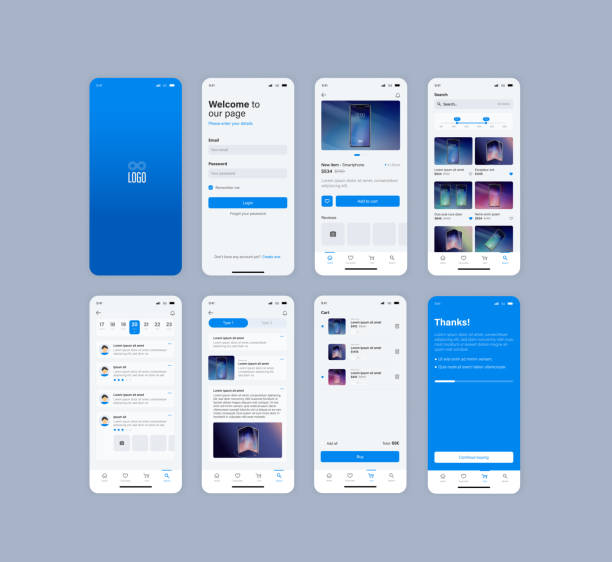
Wireframes are simple visual layouts that outline the structure of each screen.
Prototypes simulate user interactions without requiring actual code.
Benefits include:
Testing prototypes early helps identify usability issues before expensive coding begins.
Prototype Before You Code
Every hour spent improving a prototype can save many hours of redevelopment later in the project.
A strong architecture keeps the application organized and easier to maintain.
Common architectural patterns include:
Separates data, interface, and business logic.
Widely used in Android and iOS development for improved testability.
Separates responsibilities into layers, making large applications easier to scale and maintain.
Choosing a suitable architecture improves code quality and supports future growth.
The frontend is the part of the application users see and interact with.
Frontend development includes:
Performance is essential. Smooth scrolling, fast loading, and responsive interactions contribute to a positive user experience.
The backend powers your application behind the scenes.
Typical backend responsibilities include:
Cloud-based backend platforms allow developers to scale applications efficiently as the user base grows.
A well-structured database ensures data is stored securely and retrieved efficiently.
Common data types include:
Choose a database solution based on your application’s complexity, scalability, and performance requirements.
Security
Never store sensitive information such as passwords in plain text. Use secure hashing, encryption, and industry-standard authentication methods.
Application Programming Interfaces (APIs) allow your app to communicate with external services.
Examples include:
Reliable API integration expands your application’s capabilities without requiring every feature to be built from scratch.
Authentication protects user accounts and personal information.
Common authentication methods include:
Secure authentication builds user trust and protects sensitive data.
A successful app should be able to support increasing numbers of users without significant performance degradation.
Scalability considerations include:
Planning for scalability early reduces future technical challenges.
A successful mobile application combines thoughtful design with solid engineering. By focusing on user experience, selecting an appropriate architecture, building reliable frontend and backend systems, integrating secure authentication, and preparing for future growth, developers create products that are easier to maintain and more enjoyable to use.
📖 Chapter Summary
✔ Designed a user-friendly experience.
✔ Built attractive and consistent interfaces.
✔ Created wireframes and prototypes.
✔ Selected a scalable application architecture.
✔ Developed frontend and backend components.
✔ Structured secure databases.
✔ Integrated APIs and authentication.
✔ Planned for long-term scalability.
Quality Is a Competitive Advantage
An app with excellent features but poor reliability is unlikely to succeed. Thorough testing, strong security, and careful optimization help build user trust, improve ratings, and reduce costly fixes after launch.
Development is only one stage of creating a successful mobile application. Before releasing your app to the public, you must verify that it performs reliably, protects user data, functions across different devices, and meets the quality standards required by major app stores.
This chapter covers quality assurance, security, performance optimization, app store preparation, deployment, and post-launch monitoring.
Testing ensures that your application works as expected under different conditions.
A structured testing strategy helps identify problems before users encounter them.
Verifies that every feature performs correctly.
Examples include:
Evaluates whether users can easily complete common tasks.
Observe real users interacting with the app and record areas where they struggle.
Test your application on:
Compatibility testing helps provide a consistent experience across supported devices.
Evaluate:
Users generally expect mobile applications to respond quickly and smoothly.
Whenever new features are added, verify that previously working functionality has not been broken.
Regression testing is especially important for applications that receive frequent updates.
Test Early and Often
Fixing a defect during development is usually faster and less expensive than correcting the same issue after release.
Security should be integrated into every stage of development.
Important security practices include:
Security vulnerabilities can expose personal information and damage user trust.
Many applications collect personal information.
Developers should:
Transparent privacy practices contribute to long-term user confidence.
Privacy
Respecting user privacy is not only good practice—it is an important part of building a trustworthy application.
Fast applications encourage higher engagement and better user retention.
Performance optimization includes:
Compress images and remove unnecessary assets.
Minimize API requests and cache frequently used data.
Use modern image formats and responsive image sizes.
Retrieve only the information required for each screen.
Move long-running tasks away from the main interface to maintain smooth user interactions.
Before publishing, ensure that your application is complete and meets store requirements.
Prepare:
High-quality store listings improve discoverability and increase download rates.
Publishing involves submitting your application for review.
Applications are reviewed to ensure they comply with Apple’s quality, security, and design guidelines.
Applications must meet Google Play policies, including requirements related to privacy, security, and user experience.
Review times vary depending on the platform and the complexity of the application.
Publishing Tip
Carefully review each platform’s submission guidelines before uploading your application. Addressing issues in advance can reduce review delays.
Publishing your app is the beginning—not the end—of the development lifecycle.
Monitor:
Regular monitoring helps identify opportunities for improvement.
User feedback provides valuable insights into how the application performs in real-world situations.
Methods include:
Prioritize improvements based on recurring user requests and verified issues.
Successful applications evolve over time.
Updates may include:
Consistent maintenance demonstrates commitment to quality and helps retain users.
Best Practice
Release updates based on user needs and measurable improvements rather than adding unnecessary features.
Testing, security, optimization, and careful deployment are essential components of professional mobile app development. A reliable application that protects user data, performs efficiently, and receives ongoing updates is more likely to earn positive reviews, higher retention, and long-term success.
📖 Chapter Summary
✔ Conducted functional, usability, compatibility, performance, and regression testing.
✔ Implemented security and privacy best practices.
✔ Optimized performance for speed and efficiency.
✔ Prepared assets for app store submission.
✔ Published to the Apple App Store and Google Play.
✔ Monitored app performance after launch.
✔ Collected user feedback and planned future updates.

Building the App Is Only Half the Journey
A technically excellent application will not automatically succeed. Long-term success depends on effective marketing, continuous improvement, user engagement, and a sustainable business model.
After publishing your mobile application, the focus shifts from development to growth. Successful apps are continuously marketed, updated, monitored, and refined based on user feedback and changing technology trends. This chapter explores practical strategies for attracting users, generating revenue, maintaining quality, and preparing your app for future success.
Marketing should begin before your app is released.
Build awareness by:
Early marketing helps build anticipation and gather valuable feedback.
When your application is published:
A coordinated launch can significantly improve visibility.
Growth
Consistent marketing is more effective than a single large promotional campaign. Continue promoting your app long after launch.
App Store Optimization (ASO) improves your application’s visibility in app marketplaces.
Optimize:
Higher-quality listings increase discoverability and download rates.
Select a business model that aligns with your audience and product.
Generate revenue through in-app advertising while keeping the app free to download.
Provide essential features for free and offer premium functionality through subscriptions or one-time purchases.
Charge users before download.
This approach works best for specialized or professional applications that deliver clear value.
Offer additional content, virtual goods, or premium tools.
Ideal for services that provide ongoing value, such as education, productivity, fitness, or streaming applications.
Monetization
Choose a revenue model that supports a positive user experience. Excessive advertising or aggressive paywalls can reduce user satisfaction and retention.
Analytics help you understand how users interact with your application.
Track important metrics such as:
Use these insights to guide future improvements and prioritize development efforts.
Successful apps evolve based on real user experiences.
Collect feedback through:
Respond respectfully to constructive criticism and use recurring suggestions to improve the product.
Listen to Your Users
The people who use your app every day often identify opportunities for improvement that internal teams may overlook.
Maintenance is an ongoing responsibility.
Regular tasks include:
Routine maintenance keeps the application reliable and compatible with evolving platforms.
As adoption increases, prepare for additional demand.
Consider:
Scalable infrastructure supports consistent performance during periods of high traffic.
Mobile technology continues to evolve.
Emerging areas include:
Evaluate new technologies carefully and adopt those that provide genuine value to your users.
Before considering your project complete, confirm that you have:
✔ Validated your app idea.
✔ Identified your target audience.
✔ Built a focused MVP.
✔ Designed intuitive UI and UX.
✔ Developed secure frontend and backend systems.
✔ Tested functionality, usability, compatibility, and performance.
✔ Implemented security and privacy best practices.
✔ Published to the appropriate app stores.
✔ Created a marketing and ASO strategy.
✔ Established analytics and user feedback processes.
✔ Planned for ongoing maintenance and scalability.
Final Expert Advice
Treat your mobile application as a long-term product rather than a one-time project. Regular updates, thoughtful feature improvements, and responsive customer support are key to sustained success.
Building a mobile app from scratch is a multidisciplinary process that combines business strategy, user research, design, software engineering, testing, deployment, marketing, and continuous improvement. While the journey requires careful planning and persistence, following proven development practices greatly increases the likelihood of creating an application that users trust and value.
The most successful apps are rarely perfect on day one. They grow through continuous learning, user feedback, and iterative improvements. By focusing on solving real problems, delivering an excellent user experience, and maintaining high standards for security and quality, you can build a mobile application with lasting impact.
This article is intended for educational purposes and is based on established software engineering practices and official documentation from major platform providers. Because mobile operating systems, development frameworks, and app store policies evolve over time, always consult the latest official documentation before making technical or business decisions.